During this morning's Google Trends Indonesia monitoring, the term “penipuan” was recorded as an active search, with over 2,000 searches and a 1,000% increase in that snapshot. Trend data shows a rise in search interest, not the cause. Google Trends
For businesses, that signal is worth keeping in mind: digital transaction processes need to be fast, but they also must be verifiable.
Risks can arise as vendor account change requests, fake transfer proofs, refunds to different accounts, hijacked customer accounts, or payment instructions mimicking company leadership. The modus may change, but the weak point is often similar: identity not checked, instructions come from the wrong channel, approval is done by one person only, or there is no adequate audit trail.
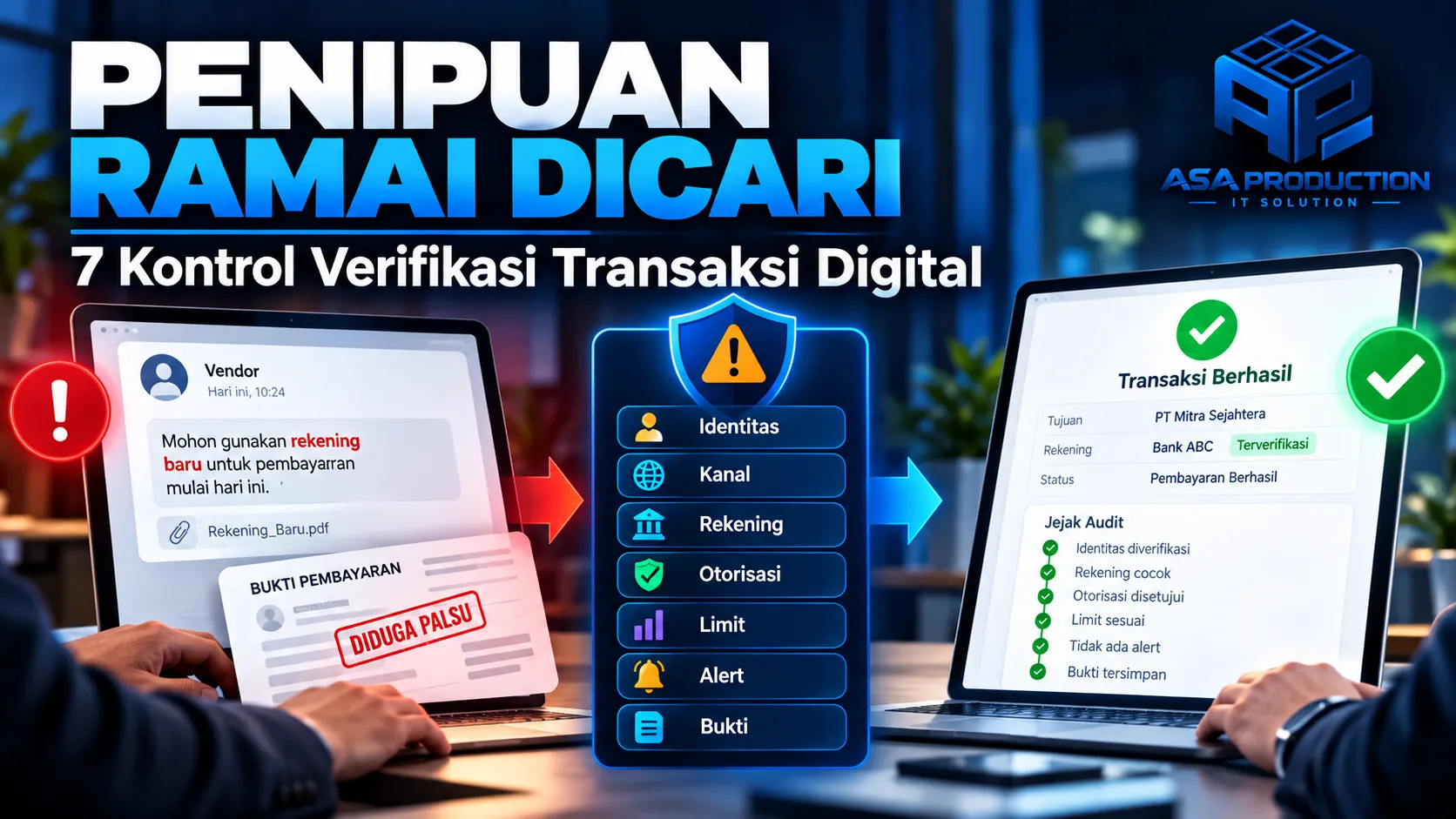
The good news is that businesses don’t have to immediately build a complex anti‑fraud system. Start with seven digital transaction verification controls that can be implemented gradually: Identity, Channel, Account, Authorization, Limit, Alert, and Evidence.
Why Digital Transaction Verification Must Be a Process, Not a Formality?
A tick on a form does not automatically make a transaction safe. Good verification is a series of checks that link who is requesting, where the request comes from, which account is used, who approves, and what evidence is stored.
OWASP recommends that users can view and confirm significant transaction data—such as destination account and amount—when giving authorization. Important transaction data should also be created and stored on the server side, while data changes should trigger a re‑authorization process. The principle is simple: the approver must clearly know what is being approved. OWASP Cheat Sheet Series
For businesses, layered verification helps reduce three problems at once:
- Operational errors, such as wrong account or amount.
- Manipulation, such as changing vendor accounts without confirmation.
- Slow investigations because evidence is scattered across chat, email, spreadsheets, and different apps.
The Seven Digital Transaction Verification Controls
1. Identity: ensure the requester is truly authorized
Don’t just check the display name, profile photo, or email address that looks correct at a glance. The system must link the transaction to a registered identity: user account, role, company, customer number, or vendor profile.
Practical steps you can apply:
- Use individual accounts; avoid a shared account for many staff.
- Enable multi‑factor authentication for users who can create or approve transactions.
- Restrict access rights based on role.
- Request re‑verification for sensitive actions, such as high‑value account changes or refunds.
- Disable access immediately when staff change roles or leave the company.
The goal is not to add friction to all activities. Additional friction is placed on the actions with the greatest impact.
2. Channel: accept instructions only through official channels
Fraudsters often exploit channel shifts: conversations start in email, then payment instructions move to a new WhatsApp number; or vendor requests come through a personal account never used before. Set an official channel for each type of transaction. For example, vendor account changes can only be submitted via the vendor portal or an email with a registered domain. If a request comes through another channel, staff should not process it immediately. They must confirm back through the official contact already stored, not the number given in the new message. Business websites and apps should also clearly display an official complaint channel. Bank Indonesia places easily accessible official information and channels as a key part of consumer protection. Clear channels help customers distinguish legitimate business communication from imitators. bi.go.id
3. Account: treat payment data changes as high‑risk events
Changes to the destination account should not be treated like ordinary data edits. Create a special process that includes documented requests, owner data checks, confirmation via old contacts, and a waiting period if the risk is high. For transactions in Indonesia, CekRekening.id from the Ministry of Communication and Digital can be used to check whether an account, e‑wallet, or crypto wallet has ever been reported for suspected criminal activity. The check result is one signal, not an absolute guarantee. Accounts never reported still need verification through internal controls. cekrekening.id
For vendors, keep a history of account changes: old data, new data, requester, time of change, supporting evidence, checker, and approver.
4. Authorization: separate the maker and the approver of the transaction
The maker‑checker control prevents one person from both creating and approving sensitive transactions. The maker enters the data, while the approver checks the recipient identity, destination account, amount, payment purpose, and supporting documents. Show a specific summary on the approval screen. Don’t just display a “Approve” button. The approver should see at least:
- Recipient name.
- Part of the destination account number.
- Amount and currency.
- Payment purpose.
- Data that changed since the last approval.
- Source of the request and supporting documents.
5. Limit: adjust checks based on risk level
Not all transactions have the same impact. Apply limits based on amount, frequency, transaction type, user role, location, or vendor profile.
Example policy:
- Small recurring payments follow the standard flow.
- Transactions above a certain threshold require two approvers.
- New vendor accounts cannot immediately receive large payments.
- Refunds can only return to the original payment method, unless an approved exception exists.
- Sudden spikes in amount or frequency pause the process for manual review.
Limits should be configurable by authorized administrators and each change logged. Avoid hard‑coding threshold values in code to keep them easy to review and adjust.
6. Alert: signal when transaction patterns deviate
Alerts don’t need to start with complex AI. Simple rules often provide quick value, such as:
- New destination account.
- Account changes and payments occur on the same day.
- Multiple failed attempts in a short period.
- Transactions outside business hours.
- Amount far above normal patterns.
- One device accessing multiple accounts.
- User requests a refund to a different account.
Each alert should have an owner, priority level, response deadline, and review outcome. Too many alerts without follow‑up only cause alert fatigue. Start with the most relevant rules, measure true and false signals, and refine regularly.
7. Evidence: keep traceable audit logs
When an incident occurs, the business must answer: who did what, when, from which channel, what data changed, and who approved it. The system must store audit trails for critical activities, not just a note that the transaction "succeeded".
OWASP considers application logs essential for incident detection and investigation. However, logs must be protected from tampering, access limited, and sensitive data not logged excessively. Transaction audit needs can be separated from technical logs if the purpose and retention period differ.
At minimum, keep:
- User identity and role.
- Consistent event timestamp.
- Action type and status.
- Value before and after change.
- Approver.
- Transaction reference number.
- Source channel or relevant device.
- Link to supporting evidence.
Avoid logging passwords, OTPs, access tokens, full card numbers, or other sensitive data.
Example Secure Flow for Vendor Account Changes
Imagine a vendor sends a message that the payment account has changed. A more secure flow is:
- Vendor submits the change through a registered portal or official email.
- The system flags the account change as high‑risk activity.
- Staff verifies the applicant’s identity and supporting documents.
- Staff confirms via the old contact stored.
- The account number is checked as one risk signal.
- A second reviewer approves or rejects the change.
- The system applies a waiting period or initial limit if needed.
- Subsequent payments display a warning that a new account is used.
- All steps, evidence, and decisions are stored in the audit trail.
This flow adds a few steps, but only for high‑risk events. Routine transactions that don’t change data can still run efficiently.
If Fraud Has Already Occurred, What Should Be Done?
Prioritize speed and completeness of evidence:
- Contact the bank or payment service provider via official channels ASAP.
- Secure the related account: change credentials, revoke active sessions, and review access rights.
- Save transfer evidence, account number, transaction time, conversations, emails, and screenshots without altering the original data.
- Report the financial fraud to Indonesia Anti‑Scam Centre (IASC) at
iasc.ojk.go.idfor financial handling. - File a report with law enforcement for legal proceedings.
- Review internal logs to identify affected accounts, devices, or flows.
OJK explains that IASC connects victim reports with related financial institutions to expedite handling. Victims are asked to prepare transaction data, account, chronology, transfer evidence, and communication proof. OJK also reminds that IASC reporting is only via its official site.
Getting Started in 30 Days
Week 1: map the highest‑risk transactions
List processes that move money or change payment destinations: vendor payments, refunds, commission payouts, account changes, and large discount approvals. Record who is involved and where evidence is stored in the app.
Week 2: set minimum policies
Define official channels, maker‑checker roles, limit thresholds, account change confirmation methods, and mandatory evidence to keep. Ensure policies are easy for operational staff to understand.
Week 3: build controls in the system
Add multi‑factor authentication, layered approvals, data change notifications, alert rules, and audit trails. If the process remains manual, use structured forms and a single reference number as an initial step.
Week 4: test scenarios and responses
Simulate new account requests, mismatched transfer evidence, refunds to different accounts, and compromised approver accounts. Measure response time and refine confusing points.
CTA: Build a Fast Yet Verified Transaction Flow
Effective anti‑fraud controls don’t have to hinder customers and operational teams.
The key is to place the right checks at the right moments, then connect identity, authorization, alerts, and evidence into a single auditable flow. Asa Production can help businesses design or enhance websites, applications, vendor portals, transaction dashboards, approval workflows, automated notifications, system integrations, and audit trails to meet operational needs. From process audits to phased implementation, solutions can be tailored to your risk level and business scale. Visit www.asaproduction.tech to discuss a safer, scalable, and user‑friendly digital transaction verification system. Build. Automate. Grow. Note: This article is educational and not legal or financial advice. Reporting procedures and compliance obligations should be adapted to the specific case, industry, and applicable regulations.